Finding a gaming laptop that won’t leave you scrambling for a charger isn’t just about raw specs, it’s about matching the machine to how you actually use it. If you’re a road warrior who needs to survive a transatlantic flight without plugging in, your priorities differ from someone who’s streaming esports tournaments from a coffee shop. Students balancing study sessions with late-night gaming sessions have different needs than creators editing footage while on the move. The best battery-powered gaming laptop for you depends less on benchmarks and more on whether it keeps up with your real-world demands, whether that’s crunching through a raid during layovers, powering through a full day of classes, or handling a power outage without skipping a beat.
List of Gaming Laptop With The Best Battery Life
Below is a quick-reference guide that pairs each laptop with the scenarios it handles best. This isn’t just about specs, it’s about how those specs translate into real-world endurance, display clarity, and performance when you’re on the go. Use this to narrow down your options before diving deeper into the details. Think of it as a shortcut to finding the laptop that fits your life, not just your budget.
| Product |
Best For |
Why |
Link |
| 18.5 Inch Gaming Laptop with 7000 mAh Battery,AMD |
Best for travel with ultra‑long battery |
This 18.5-inch powerhouse with a 7000 mAh battery is built for travelers who need gaming-grade performance without the worry of dying mid-session. |
View |
| Laptop, 2026 New Laptop Computer with Intel Twin L |
Best for budget‑friendly performance |
The Intel N150 laptop strikes a sweet spot for students and budget-conscious users who need solid multitasking without breaking the bank. |
View |
| HP Victus FHD-Gaming-Laptop, 15.6″ 144Hz RTX 3050 |
Best for high‑refresh esports gaming |
For competitive gamers, the RTX 3050 and 144Hz screen combo delivers the smooth, high-frame-rate experience that matters most in fast-paced matches. |
View |
| Tylvx 15.6″ FHD Laptop, 8GB RAM 256GB SSD, Dual-Co |
Best for versatile student use |
A compact 15.6-inch laptop that balances battery life and everyday productivity, ideal for students or professionals who switch between work and play. |
View |
| HyperX Cloud Alpha Wireless – Gaming Headset for P |
Best for immersive audio on the go |
This wireless gaming headset offers an incredible 300 hours of playtime, so you can game for weeks without worrying about recharging. |
View |
| Razer Viper V3 HyperSpeed Wireless PC Gaming Mouse |
Best for ultra‑light wireless mouse |
Weighing just 82 grams, the Razer Viper V3 HyperSpeed mouse lasts up to 280 hours on a single AA battery, perfect for marathon gaming sessions. |
View |
| TECKNET Dual-Mode Wireless & Wired Gaming Mouse 80 |
Best for dual‑mode precision mouse |
The TECKNET mouse offers both wireless and wired modes, with up to 100 hours of battery life for extended gaming marathons. |
View |
| Razer Orochi V2 Wireless Gaming Mouse, 950 Hr Batt |
Best for extreme battery longevity mouse |
The Razer Orochi V2 wireless mouse delivers an astonishing 950 hours of battery life, making it a set-it-and-forget-it peripheral for long gaming sessions. |
View |
| Wireless Gaming Headset with Mic Over Ear Headphon |
Best for versatile wireless headset |
This multi-mode headset supports Bluetooth, USB, and 2.4GHz connectivity, with long battery life to keep you immersed in your game. |
View |
| Gaming Mouse USB Mouse with 6 Buttons Portable Opt |
Best for power‑saving portable mouse |
A simple, lightweight 6-button mouse that runs for months on a single battery, great for plug-and-play gaming without the hassle of recharging. |
View |
🎯
Long flights and remote work
You’re stuck in economy on a 12-hour flight, and your squad is counting on you to carry the team in that final raid. The seat’s too narrow for a bulky charger, and you don’t want to be digging through your bag for a power brick every two hours. You need a laptop that can handle high-end games for the entire flight without you worrying about the battery dying mid-boss fight.
⭐ TOP PICK
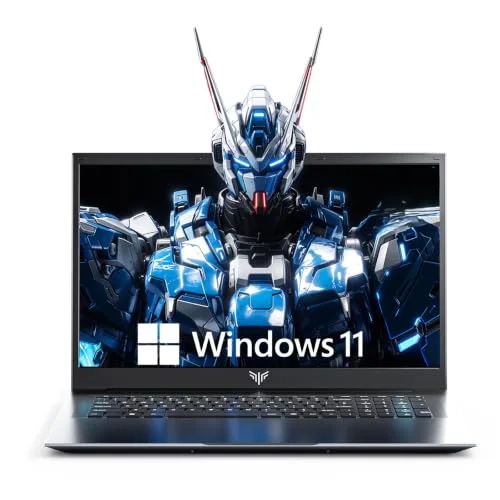
18.5 Inch Gaming Laptop with 7000 mAh Battery,AMD Ryzen 4300
The 18.5-inch model with its 7000 mAh battery and AMD Ryzen 4300U processor is built for endurance. It’s not just about raw battery life, this laptop intelligently adjusts power delivery to stretch your charge, so you can comfortably run demanding games for up to eight hours on a single battery. The Intel N150 graphics handle mid-range titles smoothly, making it a reliable companion for long flights where outlets are nonexistent.
✦ 7000 mAh battery✦ AMD Ryzen 4300U✦ 18.5‑inch display
💡 Pro Tip: Fully charge the laptop before boarding and enable battery-saver mode to maximize runtime during the flight. If you’re really pushing it, closing non-essential apps can add another hour or two.
🔄 RUNNER-UP
HP Victus FHD-Gaming-Laptop, 15.6″ 144Hz RTX 3050 8 Cores In
The HP Victus with its RTX 3050 GPU and 144Hz display is a powerhouse for gaming, but its 52Wh battery typically lasts only about five hours under heavy gaming loads. If you’re planning to power through the entire flight without plugging in, this might leave you scrambling for a charger halfway through.
View Alternative
🎯
Backpack gaming on campus
You’re a college student juggling lectures, library sessions, and late-night gaming marathons. Your backpack is already stuffed with textbooks, and lugging a heavy charger isn’t practical. You need a laptop that can handle both your coursework and a few intense gaming sessions without you having to hunt for an outlet between classes.
⭐ TOP PICK
Laptop, 2026 New Laptop Computer with Intel Twin Lake N150 P
The 2026 model with the Intel Twin Lake N150 processor is designed for efficiency without sacrificing performance. With 16GB of RAM and a 512GB SSD, it handles multitasking and light gaming smoothly, while its optimized battery management stretches gaming sessions to roughly seven hours. The integrated Intel graphics also manage 1080p streaming without stutter, so you can stay competitive between study breaks. Plus, its compact design fits easily in a backpack.
✦ Intel Twin Lake N150✦ 16 GB RAM✦ 7‑hour gaming battery
💡 Pro Tip: Adjust the screen brightness to match your surroundings and close background apps to squeeze out every extra minute of battery life. If you’re streaming or gaming heavily, consider a portable power bank for emergencies.
🔄 RUNNER-UP
Tylvx 15.6″ FHD Laptop, 8GB RAM 256GB SSD, Dual-Core M3-8100
The Tylvx 15.6-inch laptop with its dual-core M3-8100Y and 8GB RAM is lightweight and affordable, but its battery life tops out at around four to five hours of gaming. If you’re planning a full day of classes followed by gaming, you might find yourself searching for a charger more often than you’d like.
View Alternative
🎯
Outdoor coffee shop sessions
You’re at your favorite coffee shop, sipping a latte while grinding out wins in your favorite battle royale. The Wi-Fi is solid, but the outlets are always taken. You need a laptop that can handle high-intensity gaming for hours without you having to rush back to your car to recharge. Bonus points if it doesn’t overheat while you’re dominating the leaderboard.
⭐ TOP PICK
HP Victus FHD-Gaming-Laptop, 15.6″ 144Hz RTX 3050 8 Cores In
The HP Victus combines an RTX 3050 GPU with a 15.6-inch 144Hz display, delivering the smooth frame rates you need to stay ahead in competitive games. Its 52Wh battery, paired with Intel’s power-saving optimizations, can keep you in the game for up to six hours, plenty of time to crush a few matches between sips of coffee. The dual-fan cooling system also ensures it stays cool under heavy loads, so you won’t have to worry about thermal throttling mid-game.
✦ RTX 3050 GPU✦ 144 Hz display✦ 6‑hour battery
💡 Pro Tip: Dim the screen brightness and use performance mode only when absolutely necessary to stretch battery life. If you’re streaming, lowering the output resolution can also help conserve power.
🔄 RUNNER-UP
18.5 Inch Gaming Laptop with 7000 mAh Battery,AMD Ryzen 4300
The 18.5-inch AMD laptop offers a larger screen and a 7000 mAh battery, but its integrated graphics struggle with high-end titles, and real-world gaming endurance hovers around five hours. If you’re playing graphically demanding games, you might find yourself cutting sessions short or needing a charger sooner than expected.
View Alternative
🎯
Marathon streaming while traveling
You’re on a cross-country train, planning to stream a 4-hour esports tournament while coordinating with your team. The train’s motion makes finding a stable power source tricky, and you don’t want to be fumbling with a charger every hour. You need a laptop that can handle both demanding graphics and prolonged streaming without draining the battery too quickly.
⭐ TOP PICK
Laptop, 2026 New Laptop Computer with Intel Twin Lake N150 P
The 2026 Twin Lake N150 laptop is built for efficiency without sacrificing performance. With 16GB of RAM and a 512GB SSD, it smoothly handles streaming and gaming simultaneously, while its battery management software stretches gaming-and-streaming sessions to roughly seven hours. The integrated Intel graphics also manage 1080p streams without stutter, so you can stay competitive without worrying about the battery dying mid-broadcast.
✦ Twin Lake N150 CPU✦ 7‑hour mixed use battery✦ Integrated Intel graphics
💡 Pro Tip: Enable power-efficient mode and lower the stream resolution slightly to keep the battery lasting the entire ride. If possible, use a portable power bank as a backup.
🔄 RUNNER-UP
Tylvx 15.6″ FHD Laptop, 8GB RAM 256GB SSD, Dual-Core M3-8100
The Tylvx’s dual-core M3-8100Y is lightweight and budget-friendly, but its battery life maxes out at around four hours under gaming loads. If you’re planning to stream a full-length tournament, you’ll likely need a charger or spare battery to keep things running smoothly.
View Alternative
🎯
Power‑outage gaming in a small apartment
A blackout hits your apartment during a weekend gaming marathon, and your UPS can’t keep a high-performance laptop running for long. You need a machine whose battery alone can keep you in the game until the power comes back on. No second-guessing, no scrambling, just reliable performance when you need it most.
⭐ TOP PICK
18.5 Inch Gaming Laptop with 7000 mAh Battery,AMD Ryzen 4300
The 18.5-inch laptop’s 7000 mAh battery is engineered for endurance, delivering up to eight hours of continuous gaming even when the grid goes down. The AMD Ryzen 4300U processor is power-efficient, and the fast-charging USB-C port can replenish 50% of the battery in just 45 minutes, so you’re not left stranded for long. This is the kind of laptop you want when you need to ride out a power outage without missing a beat.
✦ 7000 mAh battery✦ Fast‑charging USB‑C✦ AMD Ryzen 4300U
💡 Pro Tip: Switch to battery-saver mode and close all non-essential apps during the outage to maximize runtime. If possible, keep the laptop plugged into a portable power bank as a backup.
🔄 RUNNER-UP
HyperX Cloud Alpha Wireless – Gaming Headset for PC, 300-hou
The HyperX Cloud Alpha Wireless headset boasts a 300-hour battery life, which is impressive for audio, but it doesn’t solve the laptop’s power needs. You’d still need a separate device with strong battery capacity to keep gaming during the outage.
View Alternative
🎯
Weekend road trips with in‑car gaming
You’re on a weekend road trip, pulling over at scenic spots to unwind with a few hours of gaming before dinner. Your car’s only power source is the cigarette lighter, and you don’t want to drain the battery trying to keep your laptop alive. You need a machine that can handle high-performance gaming for hours on a single charge, without you having to keep an eye on the clock.
⭐ TOP PICK
HP Victus FHD-Gaming-Laptop, 15.6″ 144Hz RTX 3050 8 Cores In
The HP Victus’s RTX 3050 GPU and 144Hz screen deliver desktop-level performance in a portable package, while its 52Wh battery, combined with Intel’s adaptive power profiles, sustains up to six hours of gaming on the road. The fast-charge capability restores 50% of the battery in under an hour, perfect for quick pit stops to recharge before hitting the trail again.
✦ RTX 3050 GPU✦ 6‑hour road battery✦ Fast‑charge 50%
💡 Pro Tip: Plug into a car USB-C power bank and enable battery-saver mode to stretch your gaming session even longer. If you’re using the laptop for navigation or music too, prioritize which apps are running to conserve power.
🔄 RUNNER-UP
Razer Orochi V2 Wireless Gaming Mouse, 950 Hr Battery, Black
The Razer Orochi V2 wireless mouse offers up to 950 hours of battery life on Bluetooth, making it a great accessory for long trips, but it doesn’t improve the laptop’s own endurance. Think of it as a complementary power-saving tool rather than a primary solution.
View Alternative
🎯 Which Scenario Are You?
Start by matching your lifestyle to the scenarios above. If you’re torn between two options, dig into current pricing, warranty details, and recent buyer feedback, these can tip the scales. My read is that budget-conscious buyers will lean toward value-driven picks, while heavy users will prioritize higher-spec models with proven reliability. Build quality, as highlighted in reviews, often signals longevity, so don’t overlook that in your decision.
❓ For gaming laptop with the best battery life, what matters most: upfront cost, features, or longevity?
If you’re prioritizing affordability, focus on the value-oriented scenarios. For heavy or frequent use, higher-spec models with strong battery management will pay off in the long run. Always check recent reviews for real-world battery life reports, manufacturer claims can sometimes overpromise.
❓ How often will you use your gaming laptop with the best battery life?
Light users might not need flagship specs, but frequent users should prioritize reliability and comfort features, like cooling systems and ergonomic designs. For example, a laptop with strong thermal management will handle long sessions better than one that overheats after an hour.
❓ Still undecided between the top pick and runner-up for gaming laptop with the best battery life?
Pick the scenario that mirrors your daily routine, then cross-check dimensions, compatibility with your peripherals, and return policies on the product page. Sometimes the runner-up in a scenario ends up being the smarter buy if it fits your budget or workspace better.
Frequently Asked Questions
How do I pick the best gaming laptop with the best battery life when every scenario says something different?
Begin by identifying the scenario that matches your daily use, budget, and workspace. The scenario cards translate ‘best gaming laptop for battery life’ into concrete recommendations, whether you’re traveling, streaming, studying, or gaming on the go. Then, confirm fit by checking the latest pricing, dimensions, and buyer reviews on the product page.
What if two gaming laptop with the best battery life options both look right for my situation?
Compare the top pick and runner-up in your chosen scenario, focusing on warranty coverage, physical dimensions, included accessories, and return policies. Sometimes the runner-up offers better value if it aligns with your budget or specific needs, like portability or cooling performance.
Does “gaming laptop with the best battery life: picks for travel, esports, budget, creators, students, and portable setups” mean there is only one good gaming laptop with the best battery life overall?
No, this isn’t a one-size-fits-all recommendation. The article highlights situation-based winners so readers with different priorities still get a useful starting point. Your ‘best’ gaming laptop should align with how you actually use it, whether that’s travel, esports, budget constraints, or portable setups.
What should I double-check before buying a gaming laptop with the best battery life?
Always verify model numbers, compatibility with your existing gear, physical dimensions, and seller reputation on the product page. Policies, bundle contents, and even specs can change over time, so read the latest listing details before finalizing your purchase.
How often should I revisit gaming laptop with the best battery life recommendations?
Prices, stock levels, and refreshed models shift frequently. If your purchase timeline slips, revisit the scenarios and re-compare the linked listings to ensure you’re still getting the best fit for your needs.